Page updated: 19 June 2026
Photoshop Painting & Brush Tools
Complete Guide to All Painting Tools
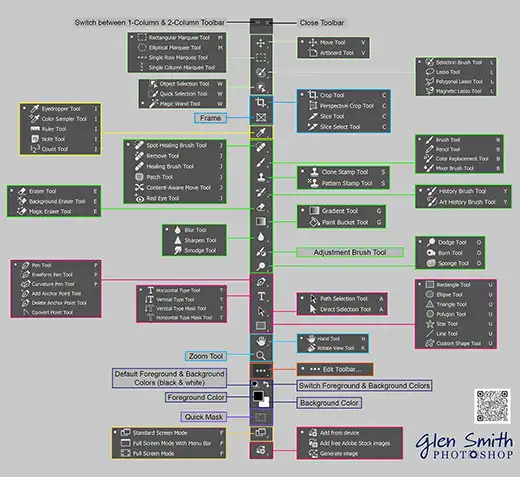
Photoshop includes a powerful collection of painting and brush tools designed for digital artists, retouchers, illustrators, and anyone who works with colour and texture. These tools allow you to paint, blend, shade, erase, smudge, sharpen, and apply creative effects with precision. Whether you are creating artwork from scratch or enhancing a photograph, the painting tools form the core of Photoshop’s creative workflow.
This page brings together every painting-related tool in Photoshop, grouped into clear categories so you can quickly find the tool you need. Each tool links to a full, step-by-step tutorial explaining how it works, when to use it, and the best settings for different tasks. From the classic Brush and Pencil tools to the Mixer Brush, Smudge, Dodge, Burn, Gradient, and History Brushes, this index acts as your complete starting point for learning Photoshop’s painting system.
If you are new to digital painting, or you want to understand how these tools fit together, use this page as your hub. Explore each tool, compare their strengths, and build a solid foundation for painting, retouching, and creative editing in Photoshop.
How to Use This Painting Tools Index
This page is organised into sections that match real Photoshop workflows. Start by browsing the core painting tools, then move on to erasers, history brushes, fill tools, and tonal brushes such as Dodge, Burn, and Sponge. Each tool name opens a dedicated tutorial with screenshots and practical examples.
For the best learning experience, pick one category at a time. Open the Brush or Pencil tool tutorial first if you are new to painting, then explore Mixer Brush for more advanced blending. Use the index to jump quickly between tools as you practise, and bookmark this page as your central reference for all painting-related tools.
As you work through the tutorials, pay attention to how different tools interact. For example, you might paint with the Brush Tool, refine edges with the Eraser or a Layer Mask, then add subtle shading using Dodge and Burn. This index is designed to help you see those relationships clearly.
Understanding the Differences Between Painting Tools
Photoshop’s painting tools each have a specific role. The Brush and Pencil tools apply colour directly, with the Brush offering soft, blended strokes and the Pencil providing hard-edged lines. The Mixer Brush simulates wet paint, allowing colours to mix and smear together for more natural, painterly effects.
History-based tools such as the History Brush and Art History Brush paint back earlier states of your image, making them ideal for creative effects or controlled undo operations. Fill tools like Gradient and Paint Bucket apply colour across larger areas, while Smudge, Blur, and Sharpen modify existing pixels to soften, smear, or enhance detail.
Tonal brushes including Dodge, Burn, and Sponge adjust brightness, contrast, and saturation rather than colour itself. These are especially useful for shaping light and shadow, adding depth, and guiding the viewer’s eye through an image.
When to Use Each Category of Painting Tools
Use the core painting tools (Brush, Pencil, Mixer Brush, Colour Replacement) when you need to apply or modify colour directly. They are ideal for digital illustration, retouching, and detailed local adjustments. Choose the Brush Tool on a Layer Mask instead of erasing pixels when you want a non-destructive workflow.
Turn to eraser tools and masking techniques when cleaning up edges, removing unwanted areas, or refining selections. Use history-based tools when you want to selectively restore previous versions of your image or create stylised effects based on earlier states.
Fill and gradient tools are best for backgrounds, large colour transitions, and graphic shapes. Smudge, Blur, and Sharpen are useful for blending strokes, softening distractions, or enhancing important details. Finally, use Dodge, Burn, and Sponge when shaping light, adding contrast, and controlling saturation to give your painting or photo more depth and impact.
ON THIS PAGE
1. Core Painting Tools


2. Eraser Tools (and Brush for Masking)
Photoshop includes several eraser tools, but for non-destructive workflows the Brush Tool on a Layer Mask is vastly superior to erasing pixels directly.


3. History-Based Painting Tools


4. Fill & Gradient Tools


5. Smudge, Blur, Sharpen & Tonal Brushes


6. Brush Workflow & Painting Helpers
These tools and controls are not brushes themselves, but they are heavily used when painting and retouching in Photoshop.